Your Product Is Leaking Money on 11 Screens You Forgot Existed

.avif)
In this article, you will learn which 11 product screens most teams never design properly — and how each one is quietly affecting the metrics your CFO actually tracks.
Most product teams obsess over the same five screens. The dashboard. The main feature. The signup form. The home page hero. The pricing comparison.
Meanwhile, half a dozen surfaces nobody designed are quietly killing conversion, retention, and trust. The work was done — somebody had to make decisions about these screens. The work just wasn't designed. It was hacked together by an engineer at 11pm using whatever the framework gave them by default.
Here are the eleven things almost every team forgets about. Each one is fixable in a sprint or two. Each one moves a metric your CFO actually tracks.

1. A landing page — yes, even for your beta
You'd be amazed how many founders ship a product without a single page explaining what it is.
"We'll do marketing later" is the polite version. The real version is: anyone who hears about your product Googles it within ten seconds, lands on a 404 or a half-finished webflow draft, and never thinks about you again. You lost the user before they ever touched the product.
A landing page is not a marketing luxury. It is the only thing standing between interested and signed up. Even for a closed beta, even for a side project, even for an internal tool — if it has users, it needs a page that answers three questions in fifteen seconds: what is this, who is it for, what do I do next.
Cost of forgetting: every word-of-mouth lead you got but didn't convert.
2. Transactional emails
Password resets. Order confirmations. "Your appointment is booked." "Your file is ready." "Welcome — here's how to get started."
Nobody designs these. The dev team copy-pastes the platform's default template, the marketing team only thinks about campaigns, and the product team assumes "someone owns this." So your most important emails — the ones with the highest open rates of any email you'll ever send — go out looking like a Mailgun debug page.
Two facts worth holding in your head: transactional emails get opened 4–8x more often than marketing emails, and the average customer reads more of your transactional copy than your homepage. This is prime real estate. Treating it as backend plumbing is a category error.
What good looks like: branded header, clear next step, mobile-first layout, scannable on a 4-inch screen, and tone consistent with the rest of your product. Not a wall of legal disclaimers in Times New Roman.
3. UX analytics — not business analytics
Your business dashboard tells you the conversion rate dropped 12% last month. Great. Why?
Most teams can't answer that question because they only track outcomes, not the breadcrumbs. Revenue, signups, MRR, churn — all measured. The 47 micro-decisions a user makes between landing and conversion? Black box.
When something breaks, you need the breadcrumbs already in place. That means: heatmaps on every revenue-touching page, session recordings on key flows, scroll depth on long pages, event tracking on every interactive element, funnel breakdowns broken down by source and device. Tools like Hotjar, PostHog, FullStory, Mixpanel exist for exactly this. They are not optional.
The day your conversion drops is not the day to start instrumenting. By then it's too late — you have no historical baseline to compare against.
4. A quarterly UX audit you actually do
Drift is invisible day-to-day. You ship a feature. Six months later, three more features have been bolted onto the same flow. None of the changes felt big at the time. Together they turned a clean onboarding into a maze.
Block one day per quarter — actually on the calendar, with a designer present — to walk through your core flows with fresh eyes. Take screenshots of every step. Time how long each takes. Try to break it. Hand it to someone who's never used your product and watch them fail.
You will be embarrassed by what you find. That's the point. Better to be embarrassed by an internal audit than by a churn spike you can't explain.
5. A/B test hypotheses (not just A/B tests)
The number of A/B tests teams run with no hypothesis is genuinely impressive. "Let's test red vs blue." "Let's see if a longer headline works." "Try moving the button up." Tests get run, results come back, nobody learns anything that compounds.
A real hypothesis looks like this: "We believe users hesitate on the pricing page because they can't tell which plan fits them. If true, replacing the feature comparison table with a 'recommended for you' picker should improve plan-page conversion by 15%+. We'll measure with checkout starts per visitor."
Now you can win or lose meaningfully. You learn something about your users either way. The next test compounds on this one. Without a hypothesis, you're just decorating dashboards.

6. Empty states, error states, edge cases
Designers design with mock data. Beautiful mock data. Twenty perfectly named items, no nulls, no overflows, no failures.
Then a real user signs up and sees a screen with nothing on it. Or hits a form field that fails validation. Or watches an upload time out. None of those states were designed. The user is now reading a raw API error message that says "Error 422: unprocessable entity" and forming an opinion of your product.
Every screen has at least four states: loading, empty, partial, and error. Designing only the populated state is designing 25% of the screen. Most products ship 25% of every screen and wonder why activation is so low.
Empty states in particular are an underrated growth lever. A well-designed empty state explains what this screen will look like when used, what the user should do first, and what value they'll get. It's onboarding hiding inside the product.
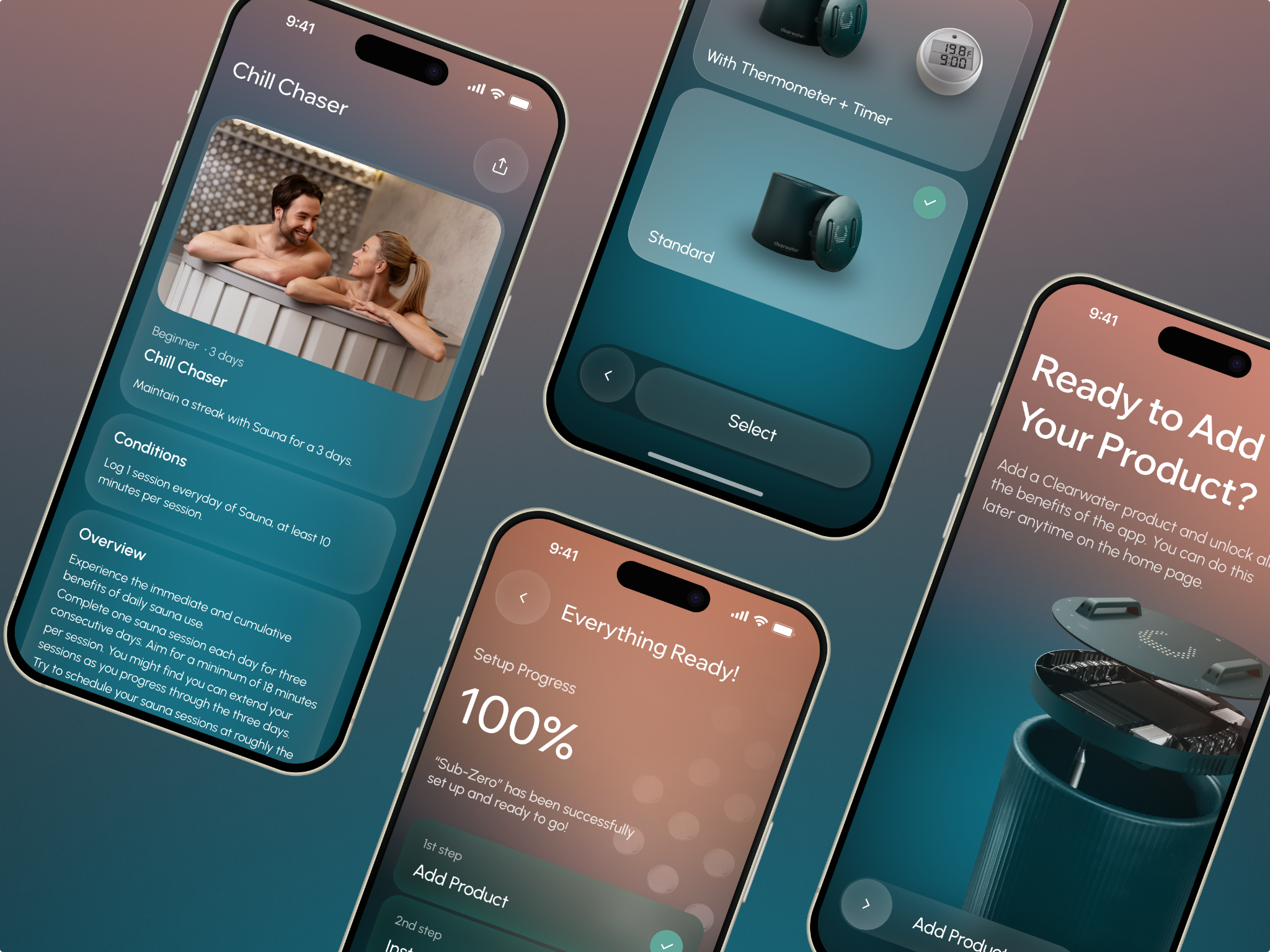
When we designed ClearWater — a wellness app for cold-plunge and sauna devices — empty and error states weren't an afterthought. The "Add Product" wizard was built with error-tolerant screens and real-time progress tracking from day one, because we knew first-time hardware setup is exactly where users rage-quit. Every state was designed: what you see before setup, what you see mid-error, what you see when it works. See how we did it →
7. The first 60 seconds after signup
Signup is not the goal. Activation is. The gap between "user created an account" and "user reached the first valuable moment" is where most products silently die.
Most teams don't design this gap. They drop the new user into the main interface and hope they figure it out. Some sprinkle a few tooltips. Almost nobody designs the first-run experience as a flow with a deliberate destination — what's the single "aha" moment, and how fast can we get there?
Every minute of friction in the first 60 seconds doubles your drop-off. Every dollar you spent on ads to acquire that user is wasted if they bounce before activation. This is the highest-leverage design surface in your entire product, and almost nobody treats it that way.
What good looks like: a clear "aha" defined upfront, a path to it that takes 2 minutes or less, a "skip for now" option, progressive disclosure of advanced features, and zero requirement to set up data the user doesn't have yet.
8. The pricing page
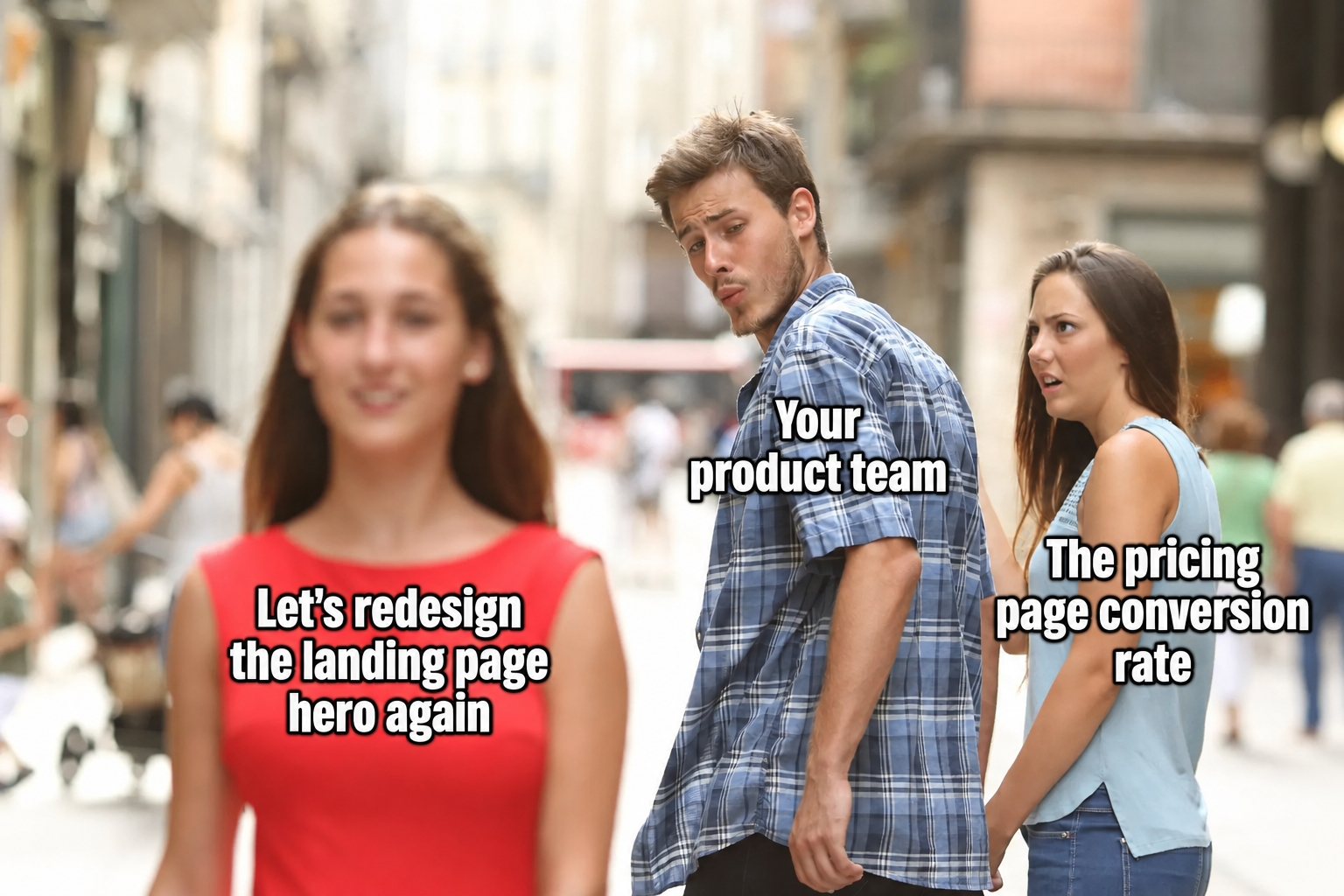
The pricing page is where 30–50% of buying decisions actually happen. It is also, statistically, the last page anyone designs.
Usually it's thrown together by marketing in a templated three-column comparison, with feature lists that copy whatever competitors did, and "Contact us" for enterprise. No social proof per tier. No FAQ. No "which plan is right for me" helper. No friction-removing trust signals. Just three columns and a hope.
This is malpractice. Pricing pages are where you justify cost, signal who you're for, demonstrate scale, and remove the last objections. They should be designed with the same rigor as your homepage hero — probably more.
9. Settings, account, and profile pages
After launch, the settings page is one of the most-visited pages in your entire product. Power users live there. Edge cases live there. The screens where users update billing, change notification preferences, manage their team, set their integrations.
Almost nobody designs it. It gets shipped as raw form fields in alphabetical order and never gets touched again. Until support tickets start rolling in about how nobody can find the "delete account" button or how changing the email address requires three steps and a confirmation dialog from 2009.
Settings pages are not glamorous. They are also where your power users — the ones who renew, the ones who refer, the ones who upgrade — spend a meaningful percentage of their time. Treating them as utility-grade work tells your most valuable users that you've stopped caring about them.
10. The cancellation flow
This is the contrarian one. Most teams either ignore the cancellation flow entirely or — worse — design it as a dark pattern: hidden behind seven clicks, gated by support tickets, padded with guilt-trippy "are you sure?" screens.
Both approaches are mistakes. Here's why a well-designed cancellation flow is one of the highest-ROI screens in your product:
- A clean "pause for 60 days" option saves 10–20% of would-churn users without forcing them to come back through full reactivation later.
- A single honest "why are you leaving?" question generates more useful product feedback than any survey you'll ever run.
- A graceful exit drives win-back rates 3–5x higher than a hostile one. Users who leave well come back. Users who leave angry warn their network.
- A respectful cancellation flow is the single strongest brand signal you can send to the rest of your users — they watch how you treat people on the way out and form their own renewal decisions accordingly.
The dark-pattern cancellation flow that "reduces churn" by 2% in the dashboard is costing you 10% in word-of-mouth you'll never measure. Design it properly.
11. UI/UX QA of the implemented design
Here's a fact that should be taught in design school but isn't: the design you approved in Figma is almost never the design that ships.
What ships is the engineer's interpretation of the design — rendered in a framework with constraints the designer didn't know about, on browsers the designer didn't test, at viewport sizes nobody mocked up, with real data shapes nobody anticipated. Padding drifts by 4 pixels. Hover states get skipped because nobody specified them. The corner radius is 6px instead of 8. The font weight is slightly off. The error state has the wrong tone of red. The mobile breakpoint at 768px looks weird because the design only had specs for 375 and 1440. The loading spinner is the framework's default, not the brand's. The animation that was supposed to be 200ms ease-out is 0ms jump-cut.
Each individual drift is small. The accumulated effect is a product that looks like it was assembled by people who didn't talk to each other — because, structurally, that's exactly what happened.
The fix is a step almost nobody includes in the process: a senior designer reviews every implemented screen before it ships. Not "looks roughly right" sign-off from a PM at standup. An actual side-by-side audit against the design spec, with every state, every breakpoint, every interactive element, on real browsers with real data. If a button's hover state was never built, you find out before users do. If the empty state ships as a blank screen instead of the designed empty state, you catch it.
This is where the gap between "a design agency" and "a design + development agency" actually matters. If your designer hands off the Figma file and never sees the implementation again, you will get drift. Every time. The only solution is a process that closes the loop — where the same team that designed it is also accountable for verifying it ships correctly.
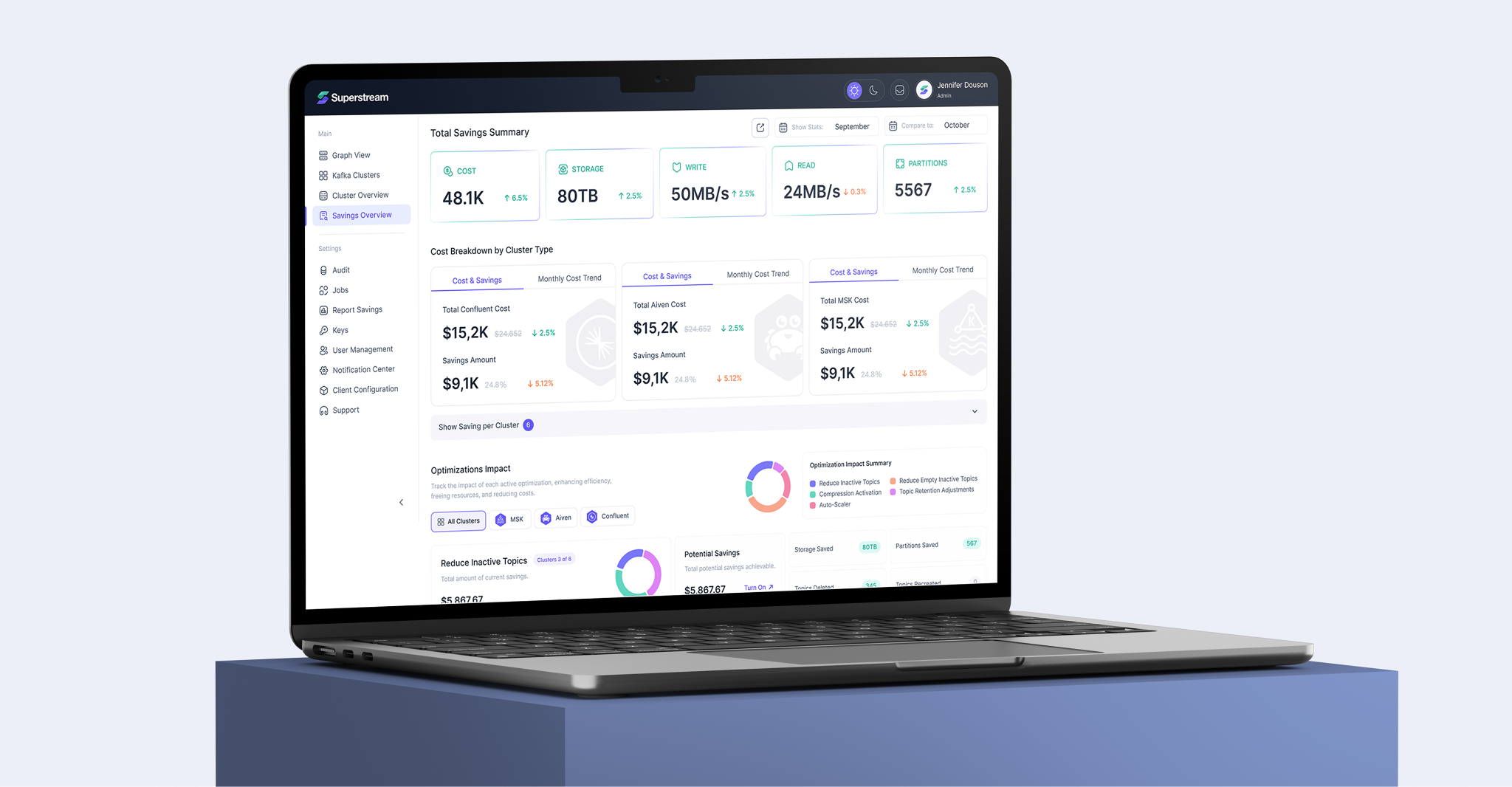
Superstream is the clearest example we have of what this process looks like at scale. We've been the design team on that product for three years — over 1,000 screens shipped across a complex DevOps SaaS platform. That kind of engagement only works if the same team that designs a screen is also accountable for how it ships. Every cluster dashboard, every savings overview, every navigation pattern went through side-by-side QA against the spec. Drift still happens. Catching it before users do is the job. See the case →
What this list adds up to
None of these eleven things are exotic. None of them require a redesign of your core product. Each one is a couple of sprints of focused work, at most.
But every one of them sits in the gap between engineering ships a working screen and design ships a deliberate experience. And every one of them affects a metric your CMO and your PM are accountable for: activation, conversion, retention, churn, NPS, support cost.
If your product has been shipping for more than a year and nobody has audited these eleven surfaces with a senior designer's eye, you are almost certainly losing money on at least five of them — quietly, in a way that doesn't show up on the roadmap, in a way that doesn't trigger an alert. Just a slow, persistent leak in the boat that your team can't find because it's not where they're looking.
In conclusion — a note for CMOs and Product Managers
Your roadmap is full. I know. Every quarter there are more features to ship than time to ship them, and the things on this list are not features. They are the surfaces between features — the unglamorous middle that determines whether everything else you built actually works as a product.
The teams that get this right don't add it to the roadmap. They make it part of the design process from day one. Every new feature ships with its empty state, its error state, its onboarding moment, its transactional email, and its analytics instrumented. The cost of designing it during the build is roughly 10% of the cost of bolting it on six months later.
If you're staring at a roadmap that doesn't account for any of this, that's not a planning problem. That's a process problem. And it's solvable.
Work with ANODA
We're a UI/UX design and development agency for SaaS, Fintech, and AI products. Since 2013, we've helped companies stop losing users on the screens nobody else was designing.
Half our work isn't features. It's the empty states, the transactional emails, the onboarding flows, the settings pages, the cancellation experiences — the unglamorous surfaces that move metrics quietly. We use AI to accelerate the work, but the judgment is human, the research is real, and every decision is one a senior designer is willing to stake their name on.

— The ANODA teamUI/UX Design & Development · Designing the screens nobody else remembers, since 2013



Got Questions?
Because they sit in the gap between "engineering ships a working screen" and "design ships a deliberate experience." Each one affects activation, conversion, retention, or trust — just quietly, without triggering a roadmap alert.
They get opened 4–8x more often. Password resets, order confirmations, and welcome emails are the most-read copy your product sends — yet almost nobody designs them. They go out as default framework templates instead.
Business analytics tells you conversion dropped 12%. UX analytics tells you why — heatmaps, session recordings, funnel breakdowns, scroll depth. Without the breadcrumbs already in place, you have no baseline to debug against.
It explains what the screen looks like when used, tells the user what to do first, and shows what value they'll get. It's onboarding hidden inside the product — and one of the most underrated activation levers you have.
You can win or lose but learn nothing that compounds. A real hypothesis specifies what you believe, why, what change should prove it, and how you'll measure it. Without that, you're decorating dashboards.
A clean pause option saves 10–20% of churning users. An honest exit question generates better product feedback than any survey. Users who leave well come back; users who leave angry warn their network.
At least four: loading, empty, partial, and error. Most teams design only the populated state — which means they've designed 25% of every screen and wonder why activation is low.
It's a senior designer reviewing every implemented screen against the spec before it ships — checking every state, breakpoint, and interactive element on real browsers with real data. Without it, implementation drift accumulates silently across every screen.
Because every minute of friction in that window doubles drop-off. Every ad dollar spent on acquisition is wasted if the user bounces before activation. Most products drop new users into the main interface and hope they figure it out.
Always, if it has users. Anyone who hears about your product Googles it within 10 seconds. A 404 or half-finished page means you lost the user before they ever touched the product. A landing page answers three questions in 15 seconds: what is this, who is it for, what do I do next.
More on UI/UX


.avif)




.avif)


.svg)
.svg)


